
Why Do GPU Clusters Need Liquid Cooling?
Liquid cooling for GPU clusters provides an efficient way to remove the increasing thermal loads generated by high-density GPU computing.
As GPUs become more powerful and clusters become denser, traditional air cooling can become increasingly difficult to scale. Liquid cooling transfers heat more efficiently from high-power GPUs, helping support higher rack densities, AI workloads and HPC environments.
The right architecture depends on GPU power, cluster size, rack density, facility design and future expansion requirements.
Want to know more? Contact us.
What Is Liquid Cooling for GPU Clusters?
Liquid cooling for GPU clusters uses a liquid coolant to remove heat generated by GPUs and associated high-performance computing components.
A typical architecture can follow:
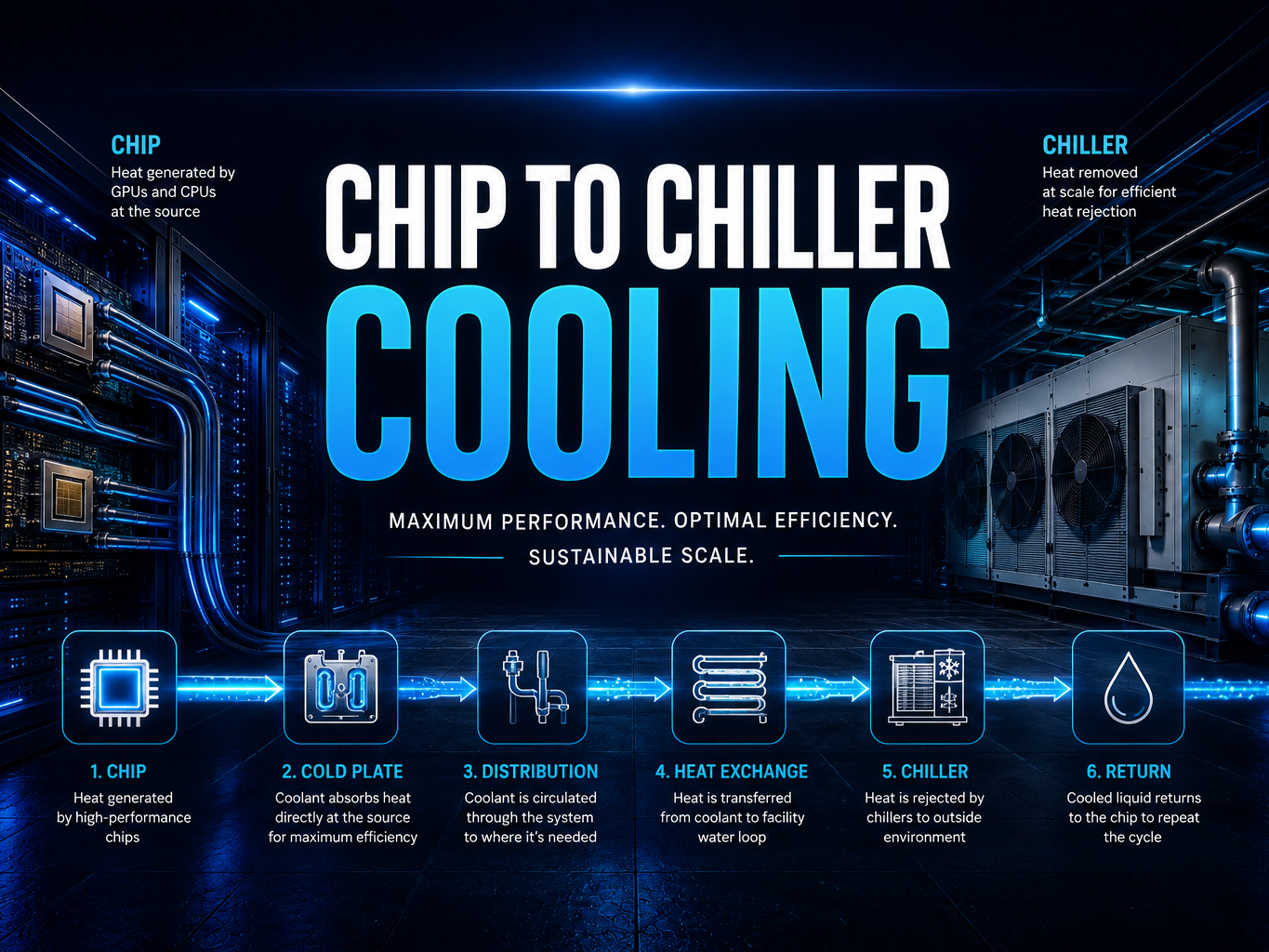
GPU → Cold Plate → Coolant Loop → CDU → Facility Cooling → Heat Rejection
Unlike conventional air cooling, which relies primarily on airflow to transport heat away from the equipment, liquid cooling captures heat much closer to the source.
This makes it particularly relevant for high-density GPU clusters.
How Does Liquid Cooling for GPU Clusters Work?
A liquid-cooled GPU cluster typically includes several connected components.
GPU
The GPU generates heat while processing AI, machine learning or HPC workloads.
Cold Plate
In a direct-to-chip system, a cold plate sits directly against the GPU and transfers heat into the coolant.
Manifold & Coolant Loop
Coolant is distributed across multiple GPUs and servers through a controlled supply and return loop.
Coolant Distribution Unit
A CDU manages coolant flow, temperature and heat transfer between the IT cooling loop and the facility cooling system.
Facility Cooling
Heat is transferred into the facility cooling infrastructure and ultimately rejected through chillers, dry coolers, heat exchangers or other systems.
The result is a continuous thermal path from the GPU cluster to the facility heat-rejection system.
Why Use Liquid Cooling for GPU Clusters?
GPU clusters can concentrate substantial computing power into a relatively small physical footprint.
Liquid cooling can help address the resulting thermal challenges by providing:
Higher Heat-Transfer Capacity
Liquid can transfer heat more efficiently than air, making it suitable for increasingly powerful GPUs.
Higher Rack Density
Improved thermal management can allow more computing capacity to be deployed within a rack or facility footprint.
Reduced Airflow Requirements
Capturing heat at the GPU can reduce reliance on large volumes of room airflow.
Scalable Cooling
The cooling architecture can be designed around the number of GPUs, rack density and future cluster expansion.
AI & HPC Readiness
Liquid cooling is increasingly relevant for high-density AI training, inference and HPC workloads.
What Type of Liquid Cooling Is Best for GPU Clusters?
There is no single solution for every GPU cluster.
Direct-to-Chip Cooling
Direct-to-chip cooling uses cold plates attached directly to GPUs and CPUs.
This is a common approach for high-density AI and GPU infrastructure because it can integrate with conventional server architectures.
Immersion Cooling
Immersion cooling places servers or components directly into a dielectric cooling fluid.
It can be considered for particularly dense computing environments or specialized deployments.
Rack-Level Liquid Cooling
Rack-level architectures bring cooling infrastructure closer to the GPU cluster and can incorporate CDUs, manifolds and dedicated coolant loops.
Hybrid Cooling
Some clusters combine liquid cooling for high-power GPUs with air cooling for other components.
The right architecture depends on GPU density, server design, facility infrastructure and deployment objectives.
How Much Cooling Does a GPU Cluster Need?
There is no universal cooling requirement.
The required cooling capacity depends on:
• GPU model
• Number of GPUs
• GPU power
• GPU utilization
• Server configuration
• Rack density
• Total IT load
• Networking and supporting equipment
• Cooling architecture
• Future expansion
A useful principle is:
The electrical power consumed by computing equipment ultimately becomes heat that needs to be removed.
As GPU cluster power increases, the cooling architecture needs to scale accordingly.
How Do You Cool a High-Density GPU Cluster?
For high-density deployments, cooling should be designed alongside the GPU, power and rack architecture.
A typical high-density liquid cooling system can follow:
GPU Cluster → Cold Plates → Manifolds → CDU → Facility Loop → Heat Rejection
The system should be evaluated as a complete thermal architecture rather than treating GPU cooling as an isolated component.
This is particularly important for large AI clusters where a cooling bottleneck can limit the usable compute capacity of the entire deployment.
Can Liquid Cooling Be Used for AI GPU Clusters?
Yes.
Liquid cooling is particularly relevant to AI GPU clusters because AI workloads can require large numbers of high-power GPUs operating simultaneously.
AI infrastructure should consider:
• GU quantity
• GPU power
• Rack density
• Cooling capacity
• Power distribution
• Networking
• Heat rejection
• Future GPU generations
Compute, power and cooling need to be designed as one system.
Can Liquid Cooling for GPU Clusters Be Retrofitted?
Potentially.
Existing data centers can sometimes be upgraded to support liquid-cooled GPU clusters, but the facility should first be evaluated for:
• Available power
• Cooling capacity
• Rack configuration
• Pipe routing
• CDU placement
• Heat-rejection capacity
• Floor loading
• Server compatibility
A hybrid approach can sometimes combine existing air cooling with liquid cooling for the highest-density GPU racks.
Does Liquid Cooling for GPU Clusters Use Water?
Not necessarily.
The coolant circulating through the GPU cluster can operate in a closed loop, while the facility-side heat-rejection system determines much of the site's overall water consumption.
Depending on the architecture, cooling can incorporate:
Closed-loop liquid cooling
Dry coolers
Air-cooled heat rejection
Chillers
Other water-efficient technologies
For water-constrained AI deployments, the complete cooling architecture should be evaluated from the GPU to final heat rejection.
How Do I Choose a GPU Cluster Cooling Solution?
Start with the compute requirements.
Evaluate:
1. GPU platform
What GPUs will be deployed?
What GPUs will be deployed?
2. GPU quantity
How many processors will the cluster contain?
How many processors will the cluster contain?
3. Rack density
How much power and heat will each rack generate?
How much power and heat will each rack generate?
4. Total IT load
What is the overall cluster power requirement?
What is the overall cluster power requirement?
5. Cooling architecture
Direct-to-chip, immersion, rack-level or hybrid?
Direct-to-chip, immersion, rack-level or hybrid?
6. Facility infrastructure
What power, cooling and heat-rejection systems are available?
What power, cooling and heat-rejection systems are available?
7. Future expansion
Can the cooling architecture support the next generation of GPUs?
The objective is to ensure that cooling capacity grows with compute capacity.
The Future of GPU Cluster Cooling
As GPU performance increases, the limiting factor for large-scale AI infrastructure may increasingly be power and thermal capacity rather than compute availability.
Liquid cooling provides a pathway to support higher-density GPU clusters while creating a more scalable thermal architecture.
The most effective approach considers the complete system:
GPU → Rack → Cooling → Power → Facility → Heat Rejection
Planning a GPU Cluster?
Tell us your GPU platform, cluster size, rack density and deployment requirements.
Want to know more? Contact us.